Solution · Workforce Planner

Workforce management for hospitality, powered by AI. Your roster starts with demand.

Workforce management for hospitality, powered by AI. Your roster starts with demand.

Your occupancy, your events and your covers all sit in different systems. Right now, pulling that together into one roster still means combining gut feel with data hunting. Our AI does it in a blink: it aggregates every demand signal across your hotel and turns it into a draft roster, you confirm. We're not another scheduling tool, we're the layer that drives your planning and keeps your labour cost in a healthy ratio to revenue.

Draft roster

Occupancy

Events

Covers

Mon

Tue

Wed

Thu

Fri

Sat

Front office

F&B

Housekeeping

Planned

Peak · event

You adjust the concept

The work schedule takes up too much time and is incorrect too often.

The problem, framed as a heading.

A manager builds the work roster by hand, often first in Excel and only then in the scheduling tool. How busy it’ll get is estimated on gut feel, not on the occupancy or the events that are actually coming up.

And the data you need lives everywhere: occupancy in the booking system, events in the calendar, availability in a chat. Piecing it together by hand costs time, and the roster is out of date again before you’ve even published it.

We make your demand the starting point: a concept roster is built in the background, while you keep control of the final call.

Lorem ipsum dolor sit amet, consectetur adipiscing elit. Sed do eiusmod tempor incididunt ut labore et dolore magna aliqua. Ut enim ad minim veniam, quis nostrud exercitation ullamco laboris nisi ut aliquip ex ea commodo consequat.

Excepteur sint occaecat cupidatat non proident, sunt in culpa qui officia deserunt mollit anim id est laborum. The drag isn’t here, it’s there — the sharp summarizing sentence.

One closing paragraph that introduces the solution: what it takes away and how it fits the way people already work. The rest happens in the background.

Where the schedule loses time

Demand estimated on gut feel, not on real occupancy

Data scattered across the booking system, calendar and chat

The schedule is outdated again before you’ve even published it

Three steps, one draft schedule that works.

From the signals that determine your busyness to a schedule where you stay in control.

Step 01

Reading the demand

Step one

We pull the signals that drive your business volume into one place: PMS occupancy, events from your banqueting system, and historical patterns from your own operation. That tells you how many people you actually need, per day and per shift.

One line describing the first action — the input from the user.

Step 02

AI drafts the schedule

Step one

We take the required staffing, layer in availability and contract specifics, and produce a full draft schedule. Personnel costs are auto-calculated, so you see the financial impact before you adjust anything.

One line describing the first action — the input from the user.

Step 03

You tweak and publish.

Step one

The draft is a starting point, not a finished product. Rework any shift, swap any name, override any recommendation, then publish into the scheduling tool you already use.

One line describing the first action — the input from the user.

What creating the schedule looks like per department.

Each department draws on its own signals from different sources, but the principle stays the same.

HOUSEKEEPING

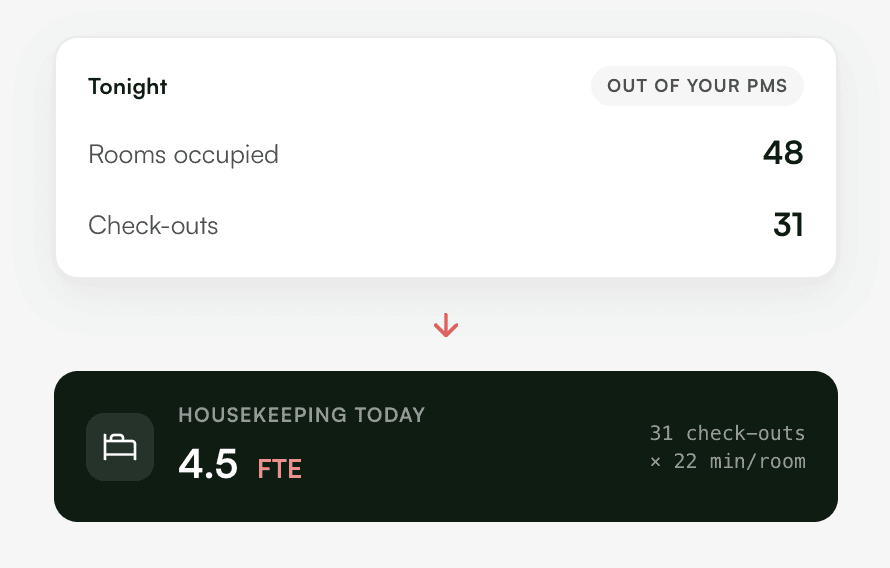
The roster follows tonight's staffing.

Before

Housekeeping is scheduled on gut feel and outdated data. Profitability leaks with every shift.

Now

Live occupancy sets the number of rooms, the type of clean and the minutes each one takes. Headcount is calculated from there. Your team is set up to deliver, and your labour cost stops leaking.
F&B

Staffing per half-day, not for the whole day.

Before

Breakfast, lunch, bar, dinner, and banqueting each run at their own busy times, but the schedule for the entire day is made by feel.

Now

Covers, reservations, and events feed the schedule for each part of the day, ensuring you are neither too short nor too full at the moments that matter.

FRONT OFFICE

From Excel to system, without retyping.

Before

Log into multiple systems, look up the data, type it into Excel, then retype it into your scheduling tool.

Now

Live data flows in via API. Your draft schedule is ready in seconds. Review it, adjust it, publish it in one click.

Five things that change.

What changes when your schedule starts with your busy schedule.

Weeks of work become hours.

The AI ​​does the heavy lifting; you review and adjust.

Schedules based on workload.

Not by gut, but by the lineup and events that are actually coming up.

Costs immediately clear.

You see the personnel costs while you plan, not just afterwards.

One source instead of separate systems.

Occupancy, availability, and contracts come together.

You are in control.

Nothing goes to your team automatically. The concept is yours to adapt.

No standalone scheduling package. A layer that translates your workload into a schedule.

We don't just replace your scheduling tool.

We don't just replace your scheduling tool.

We don't replace your existing software. We sit on top of it, read your demand signals, and generate a draft that your planners can adjust and publish in one click. If your current tooling holds you back, we'll help you find one that doesn't. But the default is simpler: keep what works, add the intelligence on top. Start in the department with the most to gain, then expand. AI drafts, your team decides.

We help SMBs set up their work smarter with software and AI. No vendor lock-in — only what fits the way you work.

It starts with discovery — sitting in, listening, mapping the process — and only then designing and building.

We do the whole chain, not just the fashionable part, and stay involved during rollout.

We help SMBs set up their work smarter with software and AI. No vendor lock-in — only what fits the way you work.

It starts with discovery — sitting in, listening, mapping the process — and only then designing and building.

How the project runs

Read in the demand

We link the signals that determine your busyness: occupancy, events, patterns.

Generate the concept

AI creates a draft schedule based on your work standards, including insight into personnel costs.

Tweak & publish

You adjust wherever you want and publish in your own package.

FAQ

Here you’ll find answers to the most frequently asked questions.

Is there a free version of scheduling software?

Free rostering tools exist, but they don't connect to your occupancy, events and contracts. You'd still be piecing it together by hand.

Is there a free version of scheduling software?

Free rostering tools exist, but they don't connect to your occupancy, events and contracts. You'd still be piecing it together by hand.

Is there a free version of scheduling software?

Free rostering tools exist, but they don't connect to your occupancy, events and contracts. You'd still be piecing it together by hand.

What's the difference between staff scheduling software and what you build?

What's the difference between staff scheduling software and what you build?

What's the difference between staff scheduling software and what you build?

Does the AI publish the schedule to our team automatically?

Does the AI publish the schedule to our team automatically?

Does the AI publish the schedule to our team automatically?

Does this comply with statutory schedule-publication deadlines?

Does this comply with statutory schedule-publication deadlines?

Does this comply with statutory schedule-publication deadlines?

Ready to stop building your schedules by hand?

A half-hour conversation is enough to see where you spend most of your time on scheduling. We listen, ask questions, and think out loud with you.